create/edit bearing line broken?

Dear caltopo developers,
Desktop App:
I want to get a compass bearing from a specific point to another specific point, but when I create a bearing line, it asks for the bearing, which is what I wanted to know by drawing the line.
so I create a bearing line using 90 for the bearing (could be anything) and something less then 5 miles

Then I edit that line
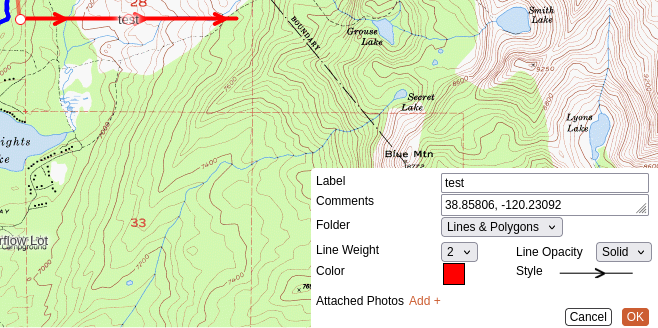
and I position the line where I want to know the compass bearing from point to point
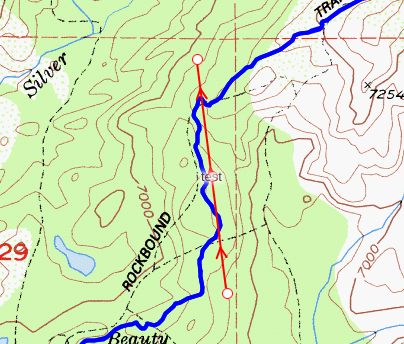
And the bearing has not been updated. It still shows "90" which obviously the edit should have changed that. The initial bearing, start coord and distance all turn into the comment. Editing does not change any of those values as they are the comment and yet the line has been modified and saved. Quite the disconnect there.
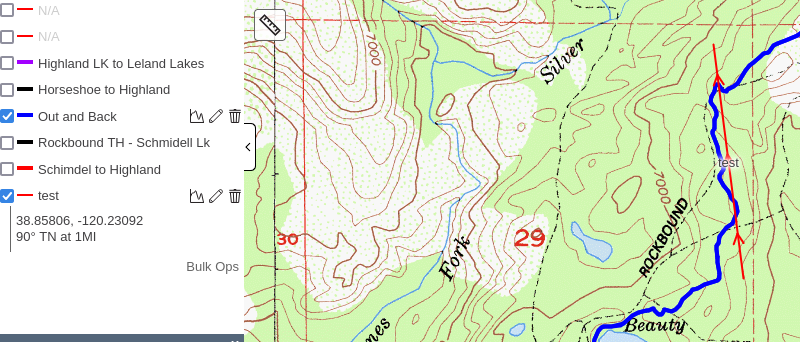
The edit should have updated the bearing to something like 352° 47′ , etc
What I expect from "Add Bearing Line" is left click on a point, keeping the left mouse button down, draw a line to another point and then a bearing line is created - a start point and a end point.
1) the compass bearing is created/updated (after edit) using the start and end points
2) the distance is created/updated (after edit) using the start and end points
3) the starting coord is updated after edit
I can't envision any input fields, other then MAYBE some optional method of calculation (see previous url)
All those things are in the caltopo app, but the "add bearing line" uses none of those existing services.
edit: That is to say, Add->Line does that dynamically. So the functions are apparently already written.
It could be that I don't understand what a bearing line is or I am doing something really wrong, in which case, flip my bozo bit and we are good.
thank you
Jim
Comments
3 comments
The bearing line simply adds a line on the map at the bearing you specify, but after that it's just a line with text attached to it; you can edit the text or edit the line, just as you can any other object.
I think what you're looking for is Measure (the ruler icon on the left side of the map) -> Bearing.
Thanks!
I missed the Measure -> Bearing action. That does allow one to copy the information in order to paste it into the Add -> Bearing line, but that is not the issue.
Allow me to restate:
And it's my contention (IMO) that bearing information should NOT be placed in the Comments property because that is for the user to put in a comment. A comment is not "data". Comments are ephemera and are prone to error if manually entered.
The two coordinate points that make up the line are stored at creation and updated upon editing. There is already a bearing/distance computation function in the code base, the Measure->Bearing does it on the fly.
Why isn't that displayed instead of the Comment property?
Clicking on the Bearing line displays the line distance, why not the calculated bearing?
At the very least, Add -> Bearing should not be editable if it is not able to display it's updated properties.
This whole thing really boils down to the correct display of bearing/distance in the Bearing object. It's not a big deal, but it's a small defect in an app that is overall very nice. Now that I know about it, I just won't use Add -> Bearing.
I hope I got my point across. Documenting defects was never my strong suite. Much easier to just sit at a terminal and demonstrate it - which is why my first post had so many pictures.
I see your point, but the way the site is currently configured, all the options in the add menu (bearing line, range ring, sector, buffer, etc) are just shortcuts to creating points, lines and polygons. Once you create a bearing line or a range ring, it's just a generic line on the map. We don't retain any metadata that says "this line started life as a bearing line", and even if we did, the UI isn't setup to check that and provide the user with an alternate edit dialog.
This often comes up with buffers, where people ask about say taking a 100' buffer and reducing it to 50'. When you draw a buffer, we generate a polygon that surrounds the line you drew, save that as a standard polygon, and then throw away the original line. So when you edit a buffer, you're just editing a generic polygon; there is no way to go back and redo it based on the original line and different parameters. Same with the bearing line - there is nothing separating it from any other line on the map, you can even add intermediate vertices if you want so that it's no longer a straight line.
Changing that behavior would be a huge change code wise.
Please sign in to leave a comment.