Sub-folders

Would it be possible to add function to create sub-folders for Map Objects, such as the ability to create folders for Ops periods then sub-folder for tracks. This may not be needed for single ops period incidents, although for multi-day incidents could add benefit for organization and decluttering large data for viewing.
Comments
37 comments
Subfolders would really help. Even just one layer deeper than current would provide a lot of organizational relief for complicated maps.
I 3rd this request!
Yes Please! One layer deeper would be really great.
I would also love this feature I think this is one of the largest things that cal topo is missing
This would be my top request as well.
Um... Yes please!
Please include this feature. I am considering transitioning from GaiaMaps to CalTopo and want to transfer years of road trip planning and recorded GPX routes over. I can't seem to find any way to create a folder within folder organization system. For example, I would like folders for Car, Motorcycle, Skiing, and Hiking. Then within each, I would like subfolders for the specific trip and corresponding sets of tracks.
Yes, this would be extremely helpful! At least one more layer would be a huge benefit.
I very much want this too.
Another request for this!
Another vote for this feature.
This is a critical capability for managing complex guiding operations.
I would really like to see Sub Folders incorporated into the data management structure. Please add this feature.
A necessary feature for sure. One more vote.
Echo the need - wonder if there has been any movement on this request.
Thanks much -
Agreed would be super helpful!
Another vote for subfolders!!! :)
Another vote!
Another Vote for Subfolders. Can we maybe get some traction here.
Subfolders would be an awesome organizational tool to have! One layer would be extremely useful, but the ability to have 2 subfolder layers would be amazing. This is how people organize items in their computer, and it seems like a no-brainer for an app such as this.
When subfolders are implemented, it really needs to handle n layers. Might as well fully solve the problem while you're in there working on it.
Hey everyone, we hear you! We know this request has been here for a long time but we do have this on our radar and we are listening to y'alls input.
If anyone has a moment, we'd love to hear more details regarding what the shortcomings of the current implementation are. What frustrates you about using the current implementation for your use case/workflow? We'd also be interested to hear a bit about your use cases and workflows so we can understand the bigger picture.
I want to stress that we're not asking for thoughts on how you'd fix things. Figuring out how to fix things is up to us, the CalTopo employees. But before we can do that I want to make sure we understand what exactly is wrong. That way we don't neglect to fix things that are causing frustration, and we don't "fix" things that aren't broken.
Thanks for taking the time to offer feedback and thoughts,
-Zach
For me the biggest 'shortcoming' is that when you have a lot of objects on one map it becomes difficult to find a particular map object in the left hand panel due to the limited screen real estate (yes, I know I can search using Ctrl + F). Just as an example, I've attached a cropped screenshot of a map with a lot of map objects. Look at how small the scroll box is! This map has map objects in the categories of 'Passes', 'My Tracks', 'Others Tracks', 'Camp Sites', etc.
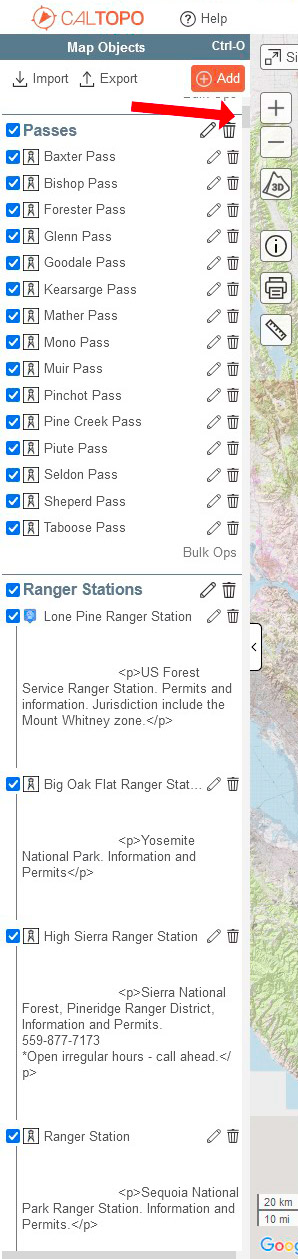
It would be both a much cleaner look and easier to use if if those Categories were collapsible and nestable (ie, folders). So I guess what I'm saying is that for my use case what the shortcoming is, is that maps with a lot of map objects the left pane become unwieldy and cluttered. It's just not a good UI/UX. Take a look at how Google Earth uses folders for categorization, it works well for me.
CASE 1: I have a map with a lot of objects right now for the county as a whole. There is information for the east desert side with several folders. There is information for the south mountain region with several folders, and for the river region, same issue. There are also folders with all the county facilities (airports, radio repeaters, hospitals, gas stations we can use, etc). I am thinking I need to add shelter site information for evacuations. I could split this into 3 separate maps, but then I have to maintain three separate maps whenever something changes and my members need to be trained that there are 3 maps... some of them already don't like computers. What would be great is if I could have a folder for each area of the county in the one map that I can then export to a new map when there is an op, this would also mean I need to maintain some objects (i.e. gas stations) across all folders, but at least that is easier than 3 maps. A way to reference one object in multiple folders would be cool.
CASE 2: During an operation, I can end up with a large number of folders and objects. This makes it hard to navigate the side panel, especially with small-screen laptops and tablets. With one more layer deep I can move some objects to a folder that is "less relevant" for keeping visible but still relevant to the main folder, especially markers with large comments (something we need the option to hide). I think this would also help a lot with organizing files (photos and PDF's).
CONCERN: I am certain that if I get more folder layers, objects/information will eventually be buried like with my shared folders at work. A search feature for just the folder area would become necessary (almost is now).
Thank you for taking the time to get our feedback.
Zach,
Hello I would love to discuss my work flow issues with your regarding the sub-folders issue. I use Cal-topo as my primary mapping program and so far have been super impressed with the ease of use and ability of the program. I do use it to map ski and hiking trails. When Working with large volumes of objects. The pane on the left of the screen becomes cluttered. Within each trail system there are multiple trails. These trails are line objects or tracks. Than off of this trail there are multiple points such as tree work to be preformed, or notable features. For trail maintenance I would like to do things like a trail folder that contains the trail track and the sub folders of "completed work" and "work to be done". Each containing points that I have found useful. This would help me track changes over time.
Pat G
Yes, as above, another backpacker here. I have a map with tons of items in different classes: routes, camps, water sources, campgrounds, peaks, passes, permit stations, bear boxes, etc.
What I would like subfolders for is so that I can create a root folder for a permit domain (e.g. Yosemite National Park) and then create subfolders for the different routes/trips + classes of objects above. The current system makes is so I have to choose EITHER a root Yosemite folder with all classes included and visible at once OR a group of root Yosemite folders in order to make such objects selectively visible. Basically, I have to choose whether I want clutter in the nav pane or clutter inside the folders
This is what I want subfolders for:
As an example, we were involved in a human remains search that stretched out into about five different search days over the course of a couple months. It was very handy to compile all of the search data into a single map, using folders to group each search day's data so that we could turn on/off individual search days. It would have been nice if, within each search day folder, we could have divided into subfolders for markers/waypoints, K9 tracks, human tracks, drone tracks, sector outlines, etc. As others have mentioned, a map with a lot of data becomes very cluttered, and the easier it is to group data and turn it on/off the more useful the map is.
Concur with all of the above,
I manage multiple ski operations and each map set has numerous large subsets including runs, helipads, landmarks, peaks, watersheds, fuel depots, etc. Many of these have further sub-sets. Nesting all of this information in a sub-folder structure makes it manageable. It would also be helpful if CalTopo did not default to all the folders being expanded. They should be collapsed when the map opens or default to the last configuration.
Someone else mentioned the Google Earth folder structure, which works great. Below are some samples.
I'm puzzled as to why we're debating the value of such a fundamental organizational capability as basic hierarchal folder structures. As a intellectual species we have used it for centuries and was the very basis of MS Windows directory structure, then Apple.
The GE example is spot on, with the ability to view/unview any folder. Individual map structures do have their purpose. But for those who like to organize by, say, geography then area/function/discipline/project, subfolders and subsubfolders are the only manageable solution.
This would be very helpful.
Please sign in to leave a comment.