Sharing tracks and markers accross different maps

Hey there
I'm relatively new to using CalTopo and I would like to know how to better organize my markers and tracks. I have a few that I've imported or saved on a specific map that I was using on the day.
I would like to have a general tracks/markers list which I can choose to display or hide on any map which I might be using but I don't know how to achieve this. Currently my markers and tracks are associated only with a single map.
Is there a way to do this?
Comments
9 comments
There are a couple of ways that I think might work for you. #1 - all of your tracks are currently saved to your account. You can see them as a selection on the layers option. Clicking on a track gives you the option to add it to any map.
#2 - If you export your tracks and markers to a geojson file ( by doing a full backup) and saving that file, you can re-import them into any map.
#3 - I don't like this option as much but f you take a snapshot of your screen with all of the tracks and markers on it, you can then create a "Map Sheet" of that image and use it as an overlay on any map. Mapsheets are great and very useful, but without further info, I am not sure if they will give you what you want.
I'm trying to follow #1 but I don't see where they are saved to my account.
In the browser when I click "Your Data" the screen comes up where I can see my maps under "Your Maps" but the "Your Layers" tab is empty and there are no tabs for makers or tracks. On the right in the "Map Layers" tab I don't see any option for markers or tracks.
The only place I can see the markers or tracks is on the "Map Objects" tab when I select the specific map that they are in.
Could you explain exactly how to navigate to where I'll see these markers/tracks - I feel like I'm missing something obvious.
Make sure you are logged in. Open any map. On the RH side of the screen under Map Layers scroll down to where you see the Your Data / Your tracks. Click on your tracks to turn them on. All of your tracks laid in your current view area should now show on this map as a pale white line. If you left click on the line you can say "Add to Map". It will now appear in the LH window as a map object under Lines and Polygons
Thanks for the details. I didn't see those checkboxes on the Map Layers. I tried to use them but I'm not seeing the behaviour I expect. When I select "Your Maps" with "All Data" and "Your Tracks" I see some items from my other map show up. I have a route under "Lines & Polygons" that shows up in white and two markers that also show up in white. However when I left click them the little box just shows their name and a link to the map which they come from but no option to add to the current map.
I also have a route under "Tracks" that doesn't show up at all on the other map no matter what I toggle on the "Your Data" section on the layers menu.
That is strange. I have included a screenshot as an example. Not sure why it is not working for you.
(I have a Pro account which adds some functionality but that should not matter here )
Here's the map which has all the info I want to share.
And here's what it looks like when I select the WENDY T Route on the other map. When I click the white line it goes yellow but it doesn't give me the profile or add to map options.
On this map I see the markers too but the "Mamquam..." route listed under tracks on the first map doesn't show up at all.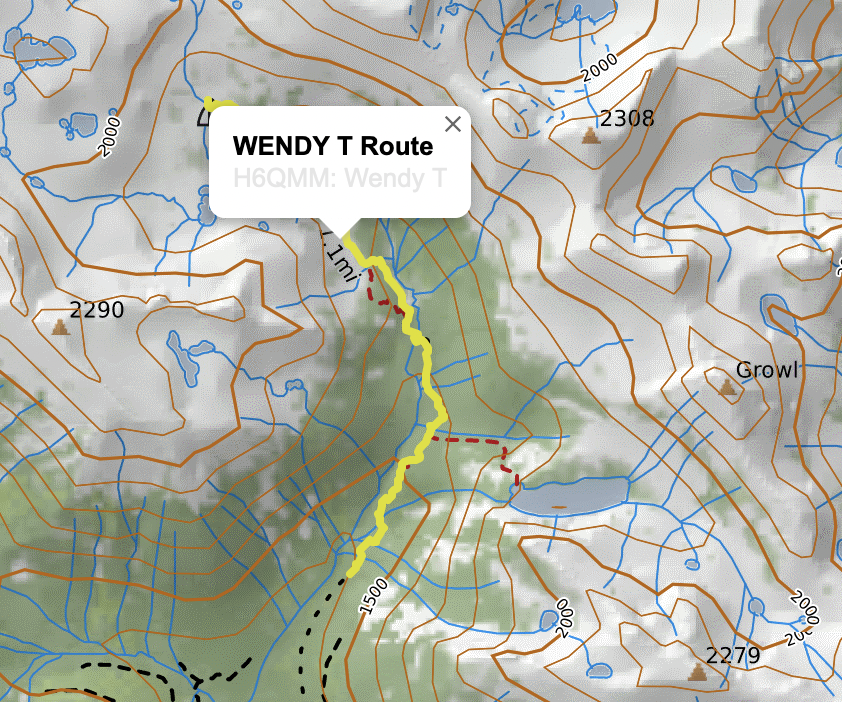
OK. I just opened up the map H6QMM and I can see the items you are looking for.
Again, I am not sure why Wendy does not give you the option to add it to your map. Did you record it on your GPS and just import the gpx file into CALTopo? I am thinking that CALTopo may not recognize it as a CALTopo "track" that has certain characteristics. I believe the one that I selected earlier was probably created by the CALTopo Mobile App and not imported from a GPX. That may ne the difference.
Mamquam, however, I do not believe it is a real 'track' at all - the lines are too straight. I believe this is just an intended route that somebody drew in. It is just stored in a folder called tracks.
That is the best interpretation that I can give you. Maybe the CALTopo staff will check in and have a better answer.
Thanks for taking the time to look at this and help out!
The wendy and mamquam routes are both imports of gpx files. The mamquam route is a low-resolution track made of just a few waypoints but this is still a useful thing to have and it would be nice to access it from different maps. Just confirming - does it also not show up for you?
Do you have the option to add the wendy route to the map when you click it?
I can see all the items on the Wendy T map. When I click on Wendy Route and the Mamquam traverse on your map it just offers to show me the Terrain Stats, Profile and the Travel Time. It does not offer to add to my map. (That only happens on my map with my own objects).
However when I exported the entire map to JSON file the Wendy track has the Class as a "Shape" with a GPSType of "Track".
Mamquam only has a class of "Field Track" (and no gpstype at all) - which is why I think CALTopo sees them differently. They are literally different objects and the code handles them differently.
Please sign in to leave a comment.