Old Map Objects Lingering

TLDR: Old map objects are lingering. Is there a cache somewhere that needs time to clear?
This is my 2026 Colorado Trail map. On it I have started routing for my 2026 thru-hike attempt.
I previously added major trails such as the PCT, AZt, full CT, CDT, and AT. Then removed them. Then added the full CT as it's own map. But have not added the others back into their own maps.
When I show Your Data, Your Maps, All Data, those deleted items are still present and claim to be sourced from the current map. But obviously are no longer present in the Map Objects. The full CT also still claims to be from the current map and not the new standalone version thereof.
How do I truly get rid of the old map objects / see current map objects from my All Data?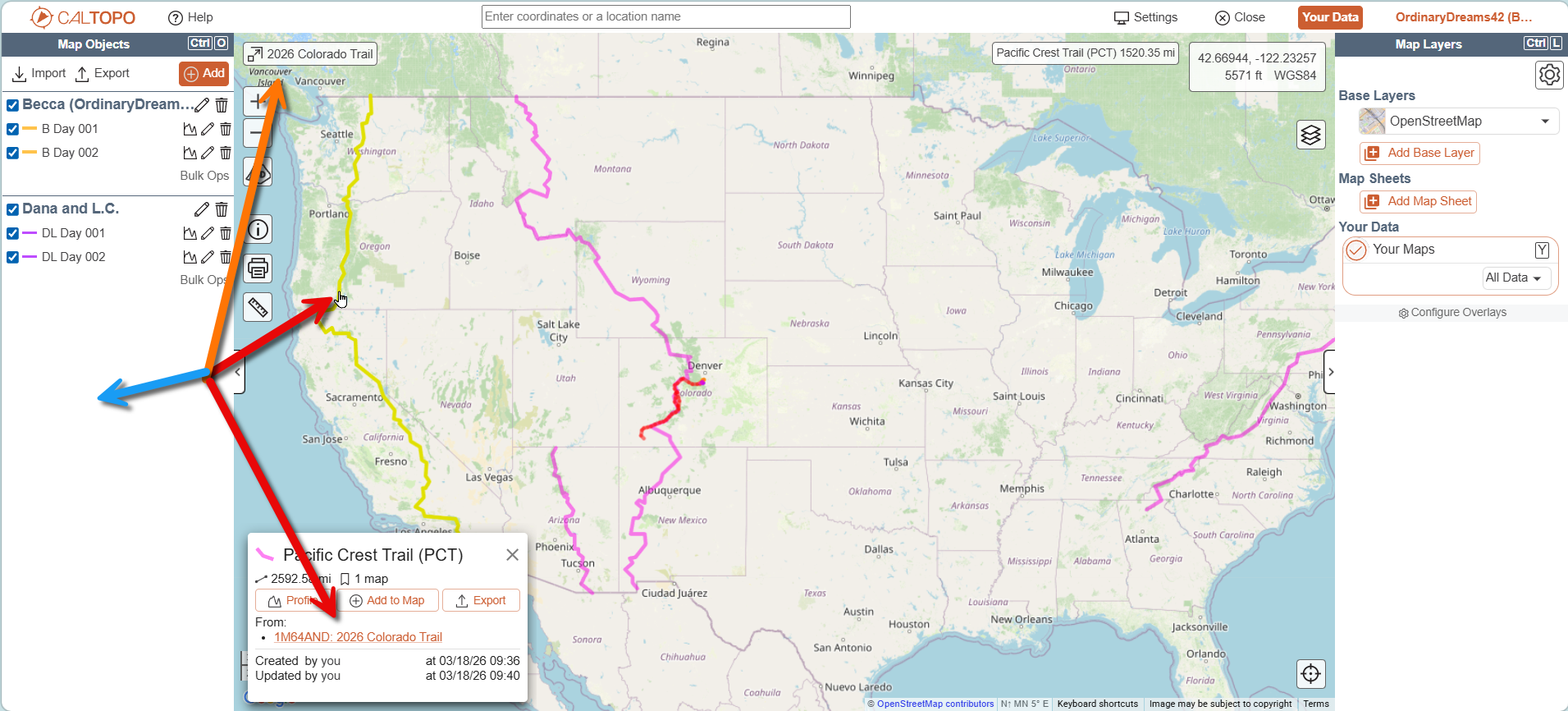
Comments
3 comments
Hi Rebecca,
You have the "your maps" overlay turned on. This will show map objects from your other maps that are in the area. Turn that off and this other map object will not show.
Nevermind, I guess I just didn't give it enough time, they've gone away. So, "a couple of hours" seems to be the cache time, if that's what is was. :0)
Thanks @Rachel. Except, at the time of the question being posted, I had NO additional maps, that was why I was asking about it. What was showing was from OLD additional maps I had deleted. But it resolved, I just didn't give it enough time before asking about it. :0)
Please sign in to leave a comment.