how do you get SVG icon files to be colorizable?

<tl;dr>I cannot get SVG icons to be colorable. Since SVG is the CalTopo recommended icon file type, I assume they can be colorable, but I cannot get it to work. I can easily get PNG files to be colorable; but not SVG files.
I'm playing around with custom icons now. In the documentation on custom icons, I read this:
"Appropriate file types include svg (recommended), png, and jpg (not recommended). ... The colorable feature depends on the file that you upload."
Because the recommended icon type is "svg", I assume these can be colorable. But it doesn't say that - so my first question is: what does it mean "it depends on the file" for it to be colorable? Are SVG files colorable? If SVG files are colorable, does the SVG file require some XML attributes to enable this feature?
I ask because I have several SVG icons and none of them are colorable. You can try it and see by doing these steps:
- Download this cow SVG icon
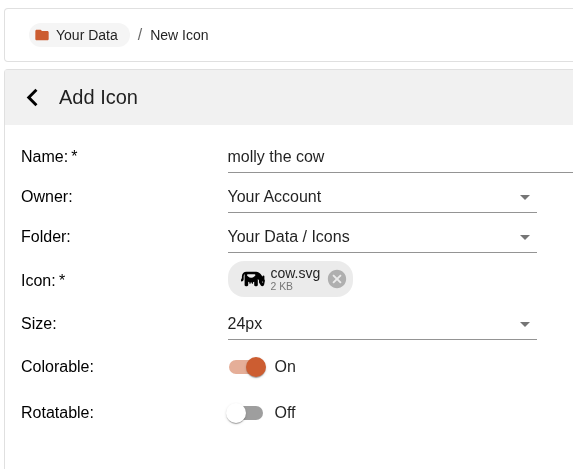
- Add it to your account, turning on the colorable setting:
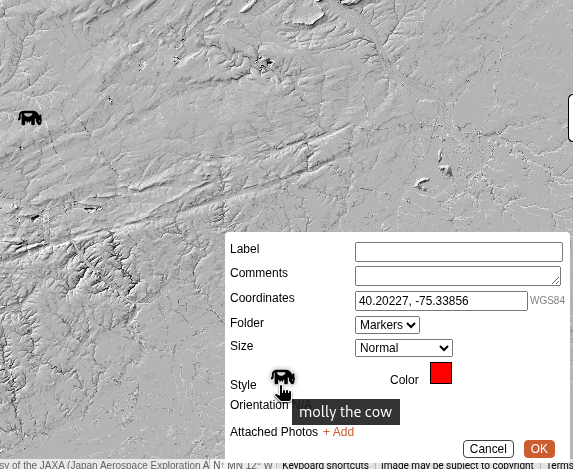
- Create a marker, and set its style to the new cow icon:
- Try to change its color - it remains black no matter what:
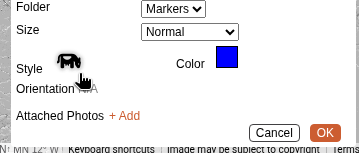
The cow.svg is a very small XML file - so I can paste it down below for you to see it. Are there any XML attributes that SVG icons need to have in order for them to be colorable by CalTopo? I did already try to add "fill=inherit" to the <path> element, and then also to the <svg> root element, but neither of those worked. Here's the original SVG icon file:
<svg xmlns="http://www.w3.org/2000/svg" viewBox="0 0 512 512">
  <path d="M 76.8 230.4 L 76.8 256 L 76.8 230.4 L 76.8 256 L 76.8 384 L 76.8 384 Q 76.8 395.2 84 402.4 Q 91.2 409.6 102.4 409.6 L 128 409.6 L 128 409.6 Q 139.2 409.6 146.4 402.4 Q 153.6 395.2 153.6 384 L 153.6 313.6 L 153.6 313.6 Q 165.6 321.6 179.2 326.4 L 179.2 345.6 L 179.2 345.6 Q 180 357.6 192 358.4 Q 204 357.6 204.8 345.6 L 204.8 332 L 204.8 332 Q 211.2 332.8 217.6 332.8 Q 224 332.8 230.4 332 L 230.4 345.6 L 230.4 345.6 Q 231.2 357.6 243.2 358.4 Q 255.2 357.6 256 345.6 L 256 326.4 L 256 326.4 Q 269.6 321.6 281.6 313.6 L 281.6 384 L 281.6 384 Q 281.6 395.2 288.8 402.4 Q 296 409.6 307.2 409.6 L 332.8 409.6 L 332.8 409.6 Q 344 409.6 351.2 402.4 Q 358.4 395.2 358.4 384 L 358.4 256 L 358.4 256 L 384 281.6 L 384 281.6 L 384 321.6 L 384 321.6 Q 384 332.8 390.4 342.4 L 424 392.8 L 424 392.8 Q 435.2 408.8 455.2 409.6 Q 469.6 409.6 479.2 400.8 Q 489.6 392.8 492.8 379.2 L 508.8 297.6 L 508.8 297.6 Q 512 281.6 502.4 268 L 499.2 264 L 499.2 264 L 499.2 198.4 L 499.2 198.4 Q 497.6 180.8 480 179.2 Q 462.4 180.8 460.8 198.4 L 460.8 209.6 L 460.8 209.6 L 418.4 150.4 L 418.4 150.4 Q 401.6 128 377.6 115.2 Q 352.8 102.4 324.8 102.4 L 217.6 102.4 L 115.2 102.4 Q 74.4 103.2 47.2 130.4 Q 20 157.6 19.2 198.4 L 19.2 241.6 L 19.2 241.6 Q 0.8 256.8 0 281.6 L 0 296 L 0 296 Q 0.8 306.4 11.2 307.2 Q 31.2 306.4 44 293.6 Q 56.8 280.8 57.6 260.8 L 57.6 256 L 57.6 256 L 57.6 230.4 L 57.6 230.4 L 57.6 198.4 L 57.6 198.4 Q 58.4 168 82.4 151.2 Q 76.8 164 76.8 179.2 L 76.8 230.4 L 76.8 230.4 Z M 448 320 Q 448.8 308 460.8 307.2 Q 472.8 308 473.6 320 Q 472.8 332 460.8 332.8 Q 448.8 332 448 320 L 448 320 Z M 133.6 184.8 Q 128 179.2 128 172 Q 129.6 155.2 146.4 153.6 L 288.8 153.6 L 288.8 153.6 Q 305.6 155.2 307.2 172 Q 307.2 179.2 301.6 184.8 L 283.2 203.2 L 283.2 203.2 Q 256 229.6 217.6 230.4 Q 179.2 229.6 152 203.2 L 133.6 184.8 L 133.6 184.8 Z" />
</svg>
Thanks for any help.
Comments
5 comments
Bumping this b/c I have the exact same question. Anyone know the answer?
Edit to add: the relevance is that SVG icons render more smoothly and are easier to see.
Updating this to say that I've confirmed with Caltopo staff that SVG icons are not able to use the colorizing option.
Sorry for the miscommunication here, but our custom SVG icons are colorable, you just need the stroke to be set to #231f20. We use that as a secret code because some of our icons are partially colorable, and when modifying them we need to know which parts to recolor and which parts to leave alone.
> our custom SVG icons are colorable, you just need the stroke to be set to #231f20
That would be something good to document :)
Here would be a good place to do so: https://training.caltopo.com/all_users/accounts/account-items#icons
I got it! It's EITHER fill or stroke... the magic color can be either:
<svg xmlns="http://www.w3.org/2000/svg" viewBox="0 0 512 512">
<path fill="#231f20" stroke="#ffffff" d="..." />
</svg>
Please sign in to leave a comment.