Be able to hide all labels for WFS Source (beta) objects

I don't think there is a way to do what I want, but please correct me if I'm wrong.
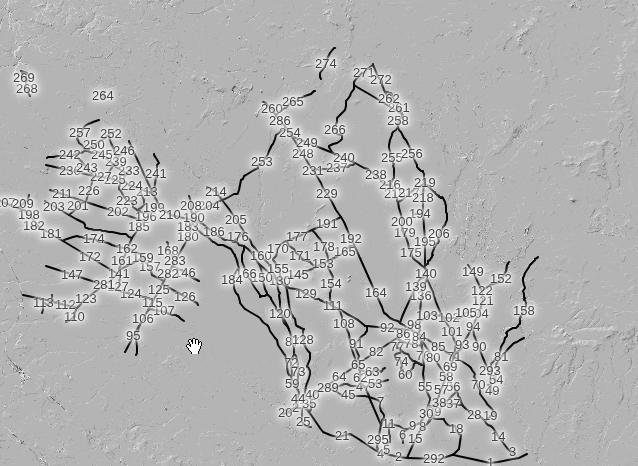
I create a WFS Source (beta) object consisting of roads in a NJ state forest. When I see the roads on the map, the names all overlap and it crowds the map. If I configure this so the "Label Name" of the WFS Source is empty, CalTopo still wants to label everything - it just picks the OBJECTID data value. I want to hide all labels so it isn't so crowded - I just want to see the roads, not the labels of the roads.
See this video for what I am talking about: https://youtu.be/2c68zr-ndsQ
You can see this for yourself. Create a "WFS Source (beta)" object with the following settings:
- Name: Wharton State Forest Visiting Vehicle Use Roads
- URL Template: https://services1.arcgis.com/QWdNfRs7lkPq4g4Q/arcgis/rest/services/Wharton_State_Forest_Visiting_Vehicle_Use_Roads/FeatureServer/19/query?where=1%3D1&f=geojson&geometry={left},{bottom},{right},{top}&geometryType=esriGeometryEnvelope&spatialRel=esriSpatialRelIntersects&inSR=4326&outSR=4326&outFields=*&returnGeometry=true
- Label Name: PRIME_NAME
- Min Zoom: 8
This is what I see:
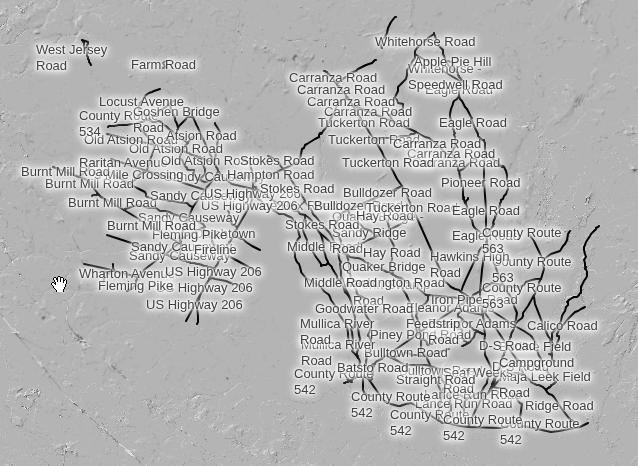
Now, set "Label Name" to an empty string and this is what I see:
Comments
1 comment
John — The WFS will respect the Settings Label setting so you should be able to choose None, Non-Overlapping, and All https://training.caltopo.com/all_users/tools/config#showlabels
Please sign in to leave a comment.