be able to hide comments in map objects list panel

The Map Objects list gets large (height-wise) when you have long comments, causing you to not be able to visualize many list items on-screen and making the user have to scroll through even a small list of objects.
This enhancement request is to put a "hide comments" feature in this list so you can collapse the list and only show the names of the objects.
For example, this takes up almost the full height of my screen with only 4 map objects. I suggest adding a checkbox somewhere in here for "Hide Comments". When checked, the comments should not be shown which would collapse that list such that it will only show the one row containing the map object icon, name and the pencil-edit button and trashcan-delete button.
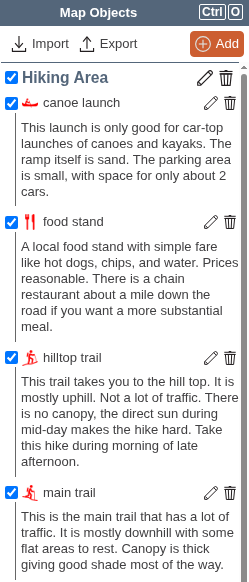
(I see this was requested a few years ago already, bumping up as this seems like low-hanging fruit that should be easy to implement)
Comments
3 comments
I agree, this would be a great feature.
This would be a great feature. I find myself avoiding leaving comments sometimes because of how much space they take up in the Map Objects window.
It could be added the folder settings for each folder below the "Visible" and "Show Labels" check boxes.
We've posted elsewhere that we plan on tackling a revamp of the left bar soon, to support nested folders. One design goal is to minimize the space taken up by comments. I don't know if we'll have a "hide comments" option specifically, for example we might instead show one to several lines of text with some indication that it is expandable to show more. But overall, I agree that this is an issue we plan to address.
Your map is actually pretty tame, compared to a KML import with an HTML table in the object description - we have seen those make it almost impossible to even find map objects in the first place.
Please sign in to leave a comment.