Multiply blend mode for shaded relief layers

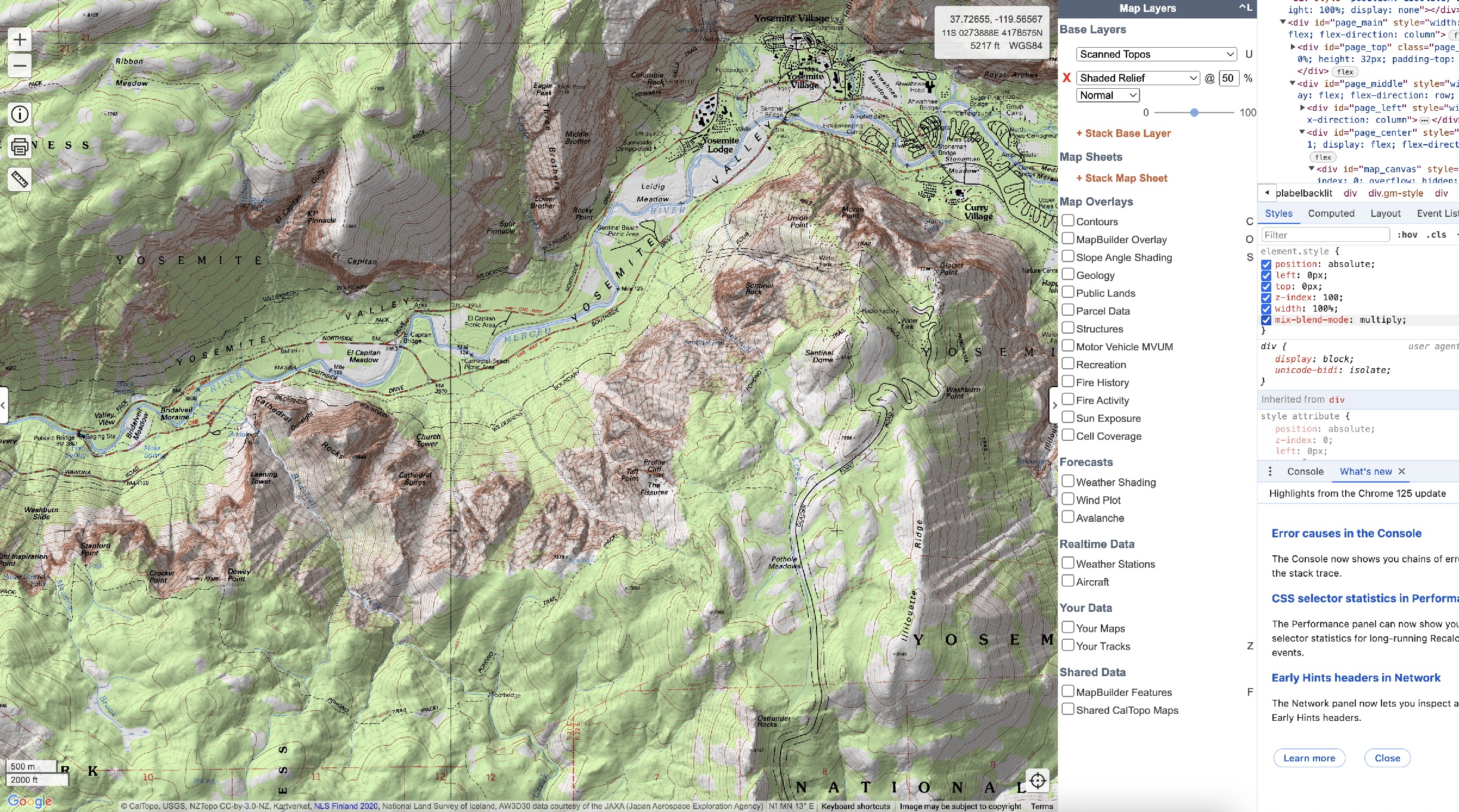
Have you considered using CSS mix-blend-mode: multiply on layers like the shaded relief layer? Currently, the shaded relief layer fogs/grays out the layers beneath where the relief is white. Using multiply would apply the shading directly to the layers beneath making topo lines and text on the other layers easier to read.
I've attached a screenshot from my browser with what that looks like using the dev tools, but I have before and after pictures of the other main layers as well.
Comments
3 comments
Hi Tim,
Take a look at using Enhanced Shaded Relief: https://training.caltopo.com/all_users/base-layers/layers#enhanced.
This layer does not function on its own. It needs another layer to display, and thus should be stacked with another layer.
Oh ok! I always wondered what the difference between those two layers was (I've been using CalTopo since before there were so many docs). However, in my web browser I only see "Shaded Relief" in the Relief Shading section. My layer list does not match what is shown in the docs. Did the option move?
Hi Tim, it is a drop down that appears below "shaded relief" once chosen. In your screenshot above you can see that it defaults to normal. That is where you can change it to enhanced.
Please sign in to leave a comment.