Move Built-in MapBuilder Topo Overlays to Standard Overlays

Hi, this is an extension of https://help.caltopo.com/hc/en-us/community/posts/8783700704155-Remove-Purple-Boundary-Lines- which doesn't have any comments yet.
I'm trying to switch over from using the Forest Service 2016 maps which I love because of how clean they are, to MapBuilder Topo which has more information. However MapBuilder Topo has quite a few built-in overlays which can't be "turned off". The most problematic in terms of clutter are the purple (in light mode) rectangular boundary lines (Tahoe National Forest, Granite Chief Wilderness boundaries, etc.) discussed in the link above. These become especially problematic in dark mode.
There are other annotations as well (hiking trails or something similar), but I can't exactly figure out what they are. What I would LOVE is a way to have the MapBuilder Topo be as plain/simple as possible and let all of these additional things be overlays which can be toggled on and off. That way we could have a really clean map if we wanted to (similar to just the Forest Service 2016 map) or something more cluttered / complicated if we preferred that.
Comments
1 comment
Hi Collin,
I just toyed around with making a custom Mapbuilder Layer, and I think I've come up with what you were wanting in term of a clean map. Here's the settings: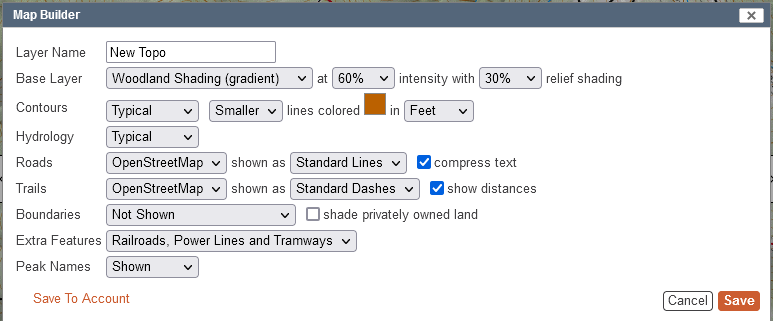
I can't speak for Caltopo on how much effort it would take to break everything out into separate overlays, but it could be a considerable effort to do that.
Also, in looking at some of my local area, the FS2016 is arguably more cluttered spacewise, while containing less data (no shaded relief, no trail segment distances.) I think part of it could be the shaded relief that the MapBuilder Topo layer has built in. I tried a custom map builder with and without it, and could see some benefit to removing the shaded relief
Anyways, hope this helps you in the meantime or gives you some ideas to work with.
MapBuilder Topo
USFS 2016
Custom Mapbuilder Layer
Custom MapBuilder Layer without Shaded Relief
Please sign in to leave a comment.