Canadian Charts - CHS ENC WMS or ESRI REST

Are there any other Canadian users out there? I am trying to figure out how to add our nautical chart service to CalTopo for use in emergency response in the marine environment. The Canadian Hydrographic Service public their Electronic Navigational Charts as WMS and ESRI REST layers. I have followed the "Add" --> "Custom Source" menu, though am met with an error relating to layer not matching the correct projection. Any tips?
CHS ENC - https://open.canada.ca/data/en/dataset/12b769c8-48b8-4562-80fb-4a2e5ee9b45b
Comments
8 comments
Jake – Thanks for the question. I think I have what you are looking for. If you use the URL below in the URL box of the Add––>Custom Source and make sure the "Type" drop down box is on WMS you should have the Canadian Marine Charts on your map. Make sure there are no spaces in the URL. Hope this helps, if you have any problems I will see your question quicker if you use help@caltopo.com and ask for Marc.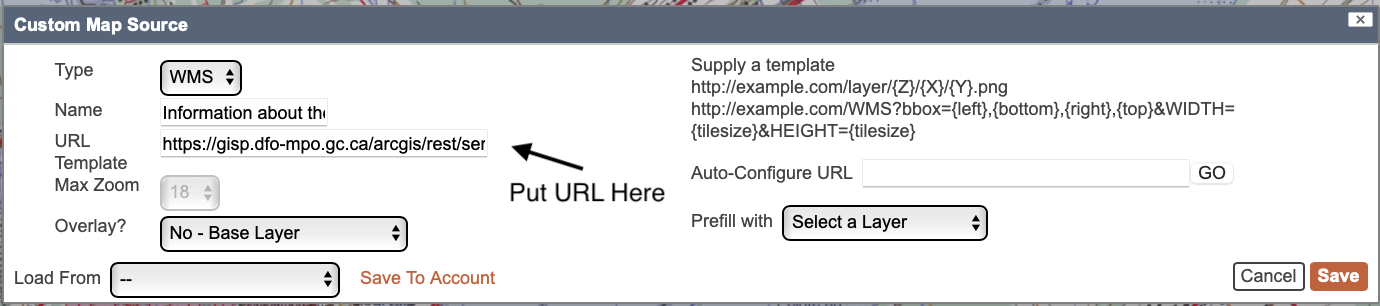
Marc
CalTopo Team
https://gisp.dfo-mpo.gc.ca/arcgis/rest/services/CHS/ENC_MaritimeChartService/MapServer/exts/MaritimeChartService/MapServer/export?dpi=96&transparent=true&format=png&bbox={left},{bottom},{right},{top}&bboxSR=EPSG:3857&imageSR=EPSG:3857&size={tilesize},{tilesize}&f=image&layers=show:0,1,2,3,4,5,6,7,8,9,10,11,12
Hi marc,
I have done this, but get a weird overly on the chart. It looks great, aside from this. Do you have another source that doesn't have the weird U's and lines?
I got that same overlay..
I think it has to do with the DFO/CHS web mapping service they are publishing.
When you load the same link into a GIS program like "QGIS", you have the option to only load certain layers form their webmapping service (see screenshot below). When I remove the layer called "Data Quality", the overlay is removed from the instance of the service that is loaded into QGIS.
Marc - I wonder if there is the option in CalTOPO to load certain layers from the CHS charts enc WMS?
Jake-Great info and really good job drilling down on this, thanks. I did a little more looking based on your info and as you said the symbols are removed when you remove the Data quality layer but the diagonal hashes are still there. Those diagonal lines are the Shallow water pattern and one may want to keep that although the shallow water seems to also be denoted by the darker blue color.
Bottom line is that list that you show from QGIS is numbered and the Name number is related to the numbers at the end of the WMS URL. So to remove the symbols the URL looks like:
https://gisp.dfo-mpo.gc.ca/arcgis/rest/services/CHS/ENC_MaritimeChartService/MapServer/exts/MaritimeChartService/MapServer/export?dpi=96&transparent=true&format=png&bbox={left},{bottom},{right},{top}&bboxSR=EPSG:3857&imageSR=EPSG:3857&size={tilesize},{tilesize}&f=image&layers=show:0,1,2,3,4,5,6,7,9,10,11,12
and to remove the symbols and the diagonal hashes it is
https://gisp.dfo-mpo.gc.ca/arcgis/rest/services/CHS/ENC_MaritimeChartService/MapServer/exts/MaritimeChartService/MapServer/export?dpi=96&transparent=true&format=png&bbox={left},{bottom},{right},{top}&bboxSR=EPSG:3857&imageSR=EPSG:3857&size={tilesize},{tilesize}&f=image&layers=show:0,1,2,3,4,5,6,7,9,10,12
Bottom line is to remove any of the layers just remove the number from the end of the URL that corresponds with the Name column in Jake's photo of QGIS
Hi there,
Thanks for providing this, had success so far. Is it possible to download these custom layers for offline use on the mobile app?
Thanks,
Ryan
The CalTopo docs state that Custom Layers requires OGC services (WMS, WFS, WMTS). But the URL shown in this post is an ArcGIS map service. Does CalTopo support ArcGIS map services in Custom Layers?
Thanks,
Bernie.
Thanks for sharing this Marc Chauvin - the base url has changed now. For those trying this out use:
https://egisp.dfo-mpo.gc.ca/arcgis/rest/services/chs/ENC_MaritimeChartService/MapServer/exts/MaritimeChartService/MapServer/export?dpi=96&transparent=true&format=png&bbox={left},{bottom},{right},{top}&bboxSR=EPSG:3857&imageSR=EPSG:3857&size={tilesize},{tilesize}&f=image&layers=show:0,1,2,3,4,5,6,7,9,10,12
Marc -- that's great. By the way, I spent a couple of low-quality hours pasting in various guesses made by Anthropic/Claude attempting to find this template URL. It was months ago, but I wonder if you could give us a sense of what your debug strategy was? Here was Claude's comment when I found your post and it compared your template URL to its latest guesses (we need some new pronouns for AIs)
Please sign in to leave a comment.